

One of Daylite's most powerful features is the ability to link objects together. There are three categories of links in Daylite: generic links, roles, and relationships.
Roles
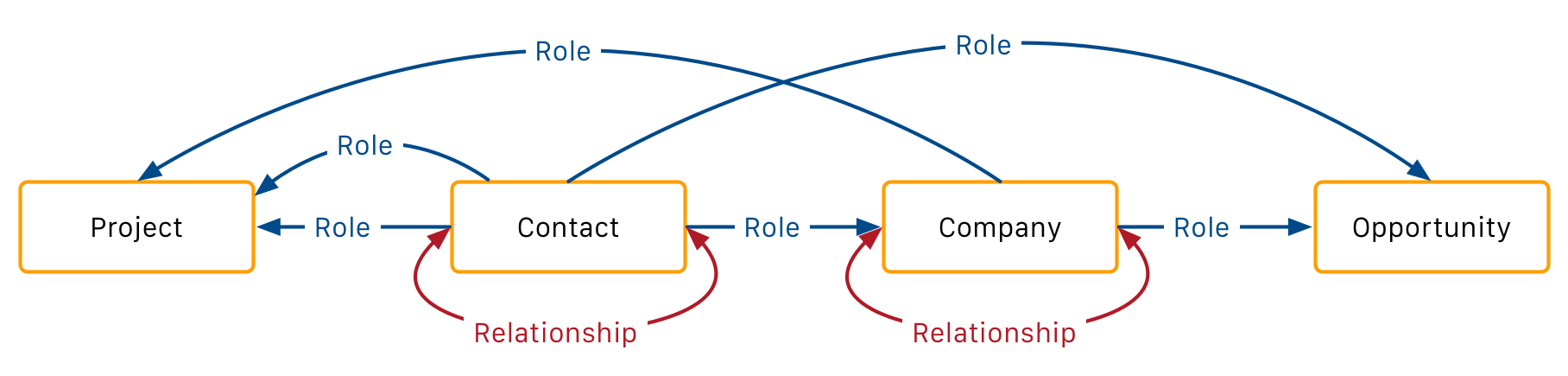
Roles are connections between objects that have attributes that express the function in the context of another object. They connect Contacts with Companies, and Contacts and Companies to Opportunities, and Projects.
Roles can have a type attribute to add context. These Role Types are user definable. However, users are encouraged to only a define a few broad types and avoid being too concise. Having too many Roles make search queries and reports more complicated, as well as having a cluttered user interface. For more details about the relationship, all Roles can specify a title, and a Role between a Contact and Company can additionally to that specify a department. Those additional attributes are free text, and not meant to be pre-defined.
Integration NotesWhen your Integration creates new roles between new or existing objects, the Role Type should be chosen by the user when configuring the integration or left blank.
Avoid creating Role Types without explicit user consent, and avoid duplication.Do not delete Role Types without user consent.
API representation of Roles
Roles are visible on both objects, under the key of the other object type.
Below is an example for a Contact with a Role in a Company with both the representation of the Contact and the Company.
{
  "self": "/v1/contacts/1000",
  "first_name": "Stephanie",
  "companies": [
    {
      "title": "Interim CEO",
      "role": "Decision Maker",
      "department": "Executive",
      "company": "/v1/companies/1000"
    }
  ]
}
{
"self": "/v1/companies/1000",
"name": "Test Inc.",
"contacts": [
{
"title": "Interim CEO",
"role": "Decision Maker",
"department": "Executive",
"contact": "/v1/contacts/1000"
}
]
}Relationships
Relationships are connections between two Contacts or two Companies. Relationships are connecting two objects of the same type. Like Roles, Relationships have a user-configurable "Relationship Type" to give more context to the connection of the two objects. However, unlike Roles, Relationships don't have a direction or a sense of ownership. The Relationship type has different names depending on the direction. E.g. the "is assistant of" has the name "has assistant" into the other direction.
Naming of RelationshipsRelationships are named in both directions, names for both directions are required. Relationships can optionally also have a short name. In cases where it's an "even relationship", where the relationship is the same for both sides (e.g. "is a competitor of"), you should define the same name for both directions.
The name of a relationship is supposed to be a fragment of text between the name of both objects.
Example: Company Ais a subsidiary of Company B and reverse Company Bthe parent of Company B
Short namesIf in your application showing the relation in a sentence-like form is not appropriate, you can use the "short" version of the name and display it behind the name of the object, either in a different color of typeface or parenthesis.
Only use the short name, when the context is obvious. A lot of databases, including the defaults for new accounts, do not define short names for Relationships. You need ensure to handle the absence of short names gracefully.
Linking
Links are undirected connections between objects unless they are connectable by a Role or Relationship.
Links don't have extra allow extra attributes.