

A conceptual overview of how Daylite organizes data, from a user and developer perspective.
Daylite tries to capture everything needed in a small business or inside a team within a company.
A user's perspective on Daylite
From a user's point of view, we can roughly classify the "things" that are needed to 'get things done' in a business into a pyramid with 3 layers.
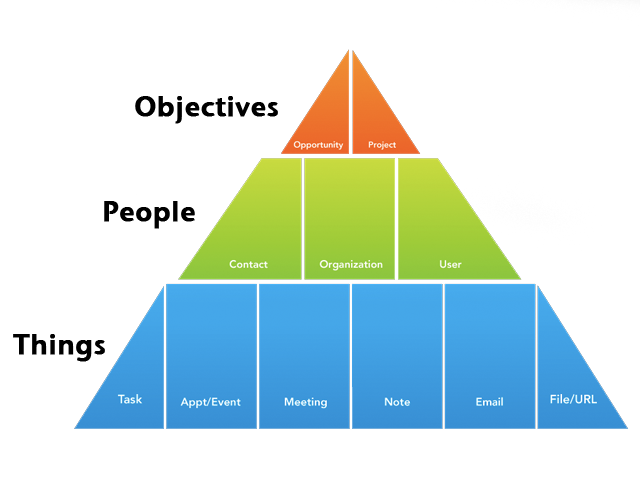
The Daylite Productivity Pyramid
The bottom layer is the Things layer. This layer consists of tasks, appointments, forms, notes, emails, and files.
The middle layer is the Contacts layer. This layer consists of people, companies, and users. You may start as a single business owner, but as you grow, you will need to track your customers, staff, competitors, etc. In addition, to be able to trade, you must develop relationships with other people and companies; hence, tracking your contacts is very important.
The top layer is the Objectives layer. Opportunities represent the potential for new business— for example, signing a contract, approving a proposal, etc. Once you win new business, it’s time for you to deliver, and this is represented by a project. You set up a project to track the entire piece of work you do for a client. This crucial top layer symbolizes new business coming in and promises being delivered.
A developer's perspective on Daylite
From a developers point of view, we see Daylite as a cyclic, partially directed graph. One of the core features of Daylite is that users can "link" objects to other objects.
Some of those objects have a clear direction (e.g. a Task belongs to a larger project), some are undirected (e.g. a Note is linked to a Contact). There are also both directions, but the relationship is different in each direction (e.g. Company A has subsidiary B. From Company A's point the relationship is "subsidiary," but from Company B's point of view the relationship is "parent company")
You can learn more about the different kinds of relationships in the Links, Roles, and Relationships section
Daylite allows users to classify objects in a variety of ways. The most common are Categories and Keywords. Most objects can have a Category and multiple Keywords; forms can only have Keywords, and users and files have neither. Users can define Categories and Keywords, however, Daylite ships with a pre-defined set of Categories and Keywords, as well as templates known as "Industry Packs." In addition to Categories and Keywords, Daylite supports object-specific classifications (both user-defined and static) and labels for inline attributes.A conceptual overview of how Daylite organizes data, from a user and developer perspective.
See the Object Classifications section for the full breakdown.